


Quick and Easy Access to Your Database with TMS Tool Management Solutions from ZOLLER
With ZOLLER’s TMS Tool Management Solutions software, manufacturing companies can quickly and easily create a comprehensive database for digital tool management.

|


With ZOLLER’s TMS Tool Management Solutions software, manufacturing companies can quickly and easily create a comprehensive database for digital tool management.
Christoph Zoller, Managing Director of E. Zoller GmbH & Co. KG—a family-owned technology company specializing in the cost-effective handling of cutting tools based in Pleidelsheim—addresses the reservations that medium-sized manufacturing companies have regarding the digitization of tool organization and management: “With our TMS Tool Management Solutions software, users can import data at the touch of a button from individual spreadsheets, catalogs, and the Internet.” This allows them to quickly and conveniently lay the foundation for extensive digitization of internal processes related to the use of cutting tools.
The outstanding benefits of digitized tool management include:
All departments involved in manufacturing benefit from these advantages: purchasing, CAD design, CAD/CAM programming, tool preparation (including measurement, adjustment, assembly, and disassembly), the tool warehouse, and machine setup personnel. Manufacturing itself minimizes downtime and the risk of damage to machines and tools due to collisions.
Regarding the creation of master data for digitized tool management, Robin Bender, Project Manager for the TMS Tool Management Solutions software at ZOLLER, says: “Our software can be flexibly adapted to meet specific requirements. For example, master data can be easily and quickly imported from the frequently used tables in standard Excel software.” ZOLLER provides a standardized table (a template) for this purpose. The TMS Tool Management Solutions software reads tool data from this template in no time and saves it in the designated data fields. The data from existing custom tables simply needs to be converted to match ZOLLER’s standard table—that is, entered into the corresponding columns. “Of course, we support our customers with conversion software. All we need is the formatting of the individual tables. Then the tool data can be transferred to our tool management software at the touch of a button,” explains Robin Bender.
Robin Bender describes importing via the ToolsUnited internet platform from Cimsource in Aachen (www.cimsource.com) as another very convenient and fast method for data transfer. It is accessed directly from within the ZOLLER software. “There, you can choose primarily from standard tools offered by a wide range of internationally active tool manufacturers. You can select each one individually with a click of the mouse and start the data transfer,” reports Robin Bender.
An interface for this purpose is integrated into the ZOLLER software. It allows individual tools to be imported using the manufacturers’ part numbers. Alternatively, you can select by machining process and display comprehensive lists. The selection can be refined using additional criteria—such as diameters, lengths, and number of cutting edges. At the push of a button, the selected tools are imported into the TMS Tool Management Solutions software. All that is required is to enter an individual identification number.
Optionally, this can be automated for complete tool lists. This allows a comprehensive selection of standard tools to be entered into the tool management software in the shortest possible time with minimal effort. A particular advantage is that the software includes standardized tool parameters from manufacturers and, upon request, 3D graphics for current CAD/CAM programming and simulation systems. When investing in ZOLLER software, you only need to obtain a (time-limited) license for the ToolsUnited internet platform.
If manufacturing companies primarily work with tools from only one or a few manufacturers, automated data import directly from their digital catalogs on the Internet is also worthwhile. However, data import depends on the options provided by the respective manufacturers. Robin Bender comments: “Some tool manufacturers provide only complete catalogs as data sets, while others also offer selection criteria, such as by technical characteristics. With the latter, you can import individually predefined lists of tools.” This is possible because the master data for the tools is stored and labeled in a largely standardized manner.
Robin Bender adds: “Of course, specialists can further edit the automatically imported tool data individually within the ZOLLER software. For example, you can use the editing function to assign your own master data numbers or add additional fields for selecting lists.”
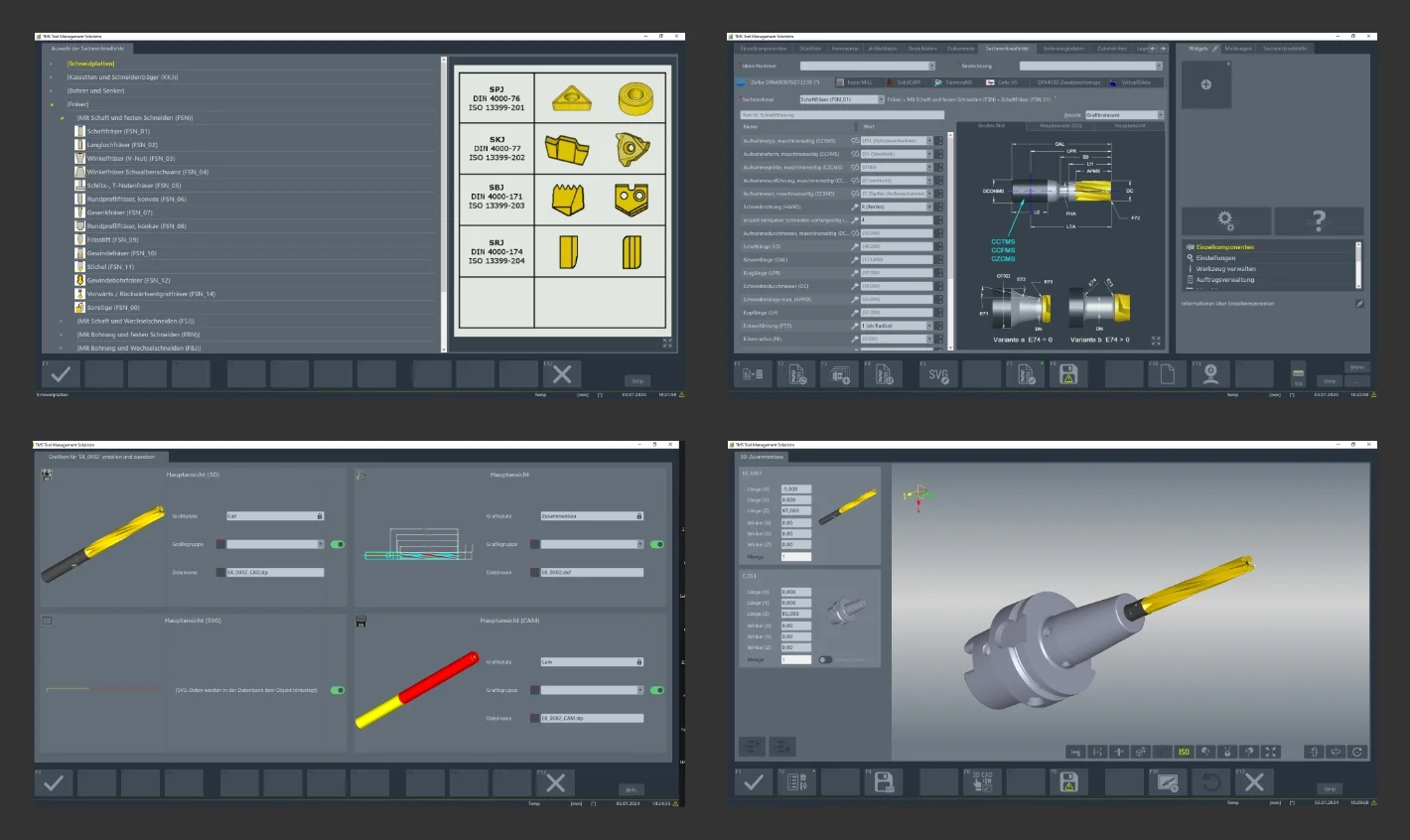
If manufacturing companies work with custom tools, these can be defined and saved in the TMS Tool Management Solutions software using input fields with a wide range of parameters and criteria. “First, staff select a machining process for the tool to be created, such as milling. Then they see a master data sheet for milling tools on the screen. This sheet contains the geometries and parameters to be defined for this tool category,” reports Robin Bender.
First, an identification number must be assigned, followed by the data describing the respective tool. Robin Bender adds: “The advantage of our tool management software is that data not necessarily requiring individual specification is already provided with default values. Therefore, just a few parameters are usually sufficient to define a tool adequately for use in tool management.” These include, for example, some basic dimensions. Further details, such as rake angles on cutting edges and similar geometries, can be specified precisely later, provided this is necessary for use in CAD/CAM systems, in presetting, and on CNC machines.
This single data entry is available in the TMS Tool Management Solutions software for both monoblock tools, such as solid carbide cutters, and for assembled complete tools. For the latter, automatic plausibility checks in accordance with DIN 4000 ensure that only sensible and technically feasible complete tools are specified and saved. In this way, ZOLLER’s software ensures maximum process reliability.
If components are already included in the tool management software, complete tools can be created partially automatically. To do this, the operator simply selects the desired components, such as the tool holder, collet, and solid carbide drill. After checking for compatible geometries, the ZOLLER software automatically assembles the complete tool. To save the tool, a master number is entered, thereby creating a separate data record. The tool management software automatically generates a 3D model (solid model) for CAD/CAM programming and simulation.
When installing the TMS Tool Management Solutions software and when selecting and creating master data, ZOLLER specialists naturally support professionals in manufacturing
. “We want to pave the way for smaller companies in particular to achieve comprehensive digitalization with all its benefits. To this end, we make our extensive expertise and experience from industrial practice available. Users can fully rely on the know-how of our qualified experts. “We provide detailed advice on the optimal methods for entering data into our software. In addition, we have designed the software to be largely intuitive to use. This means that even staff with little experience in using software can, after minimal training, successfully and profitably use our tool management software in no time,” emphasizes Christoph Zoller.

 Back to overview