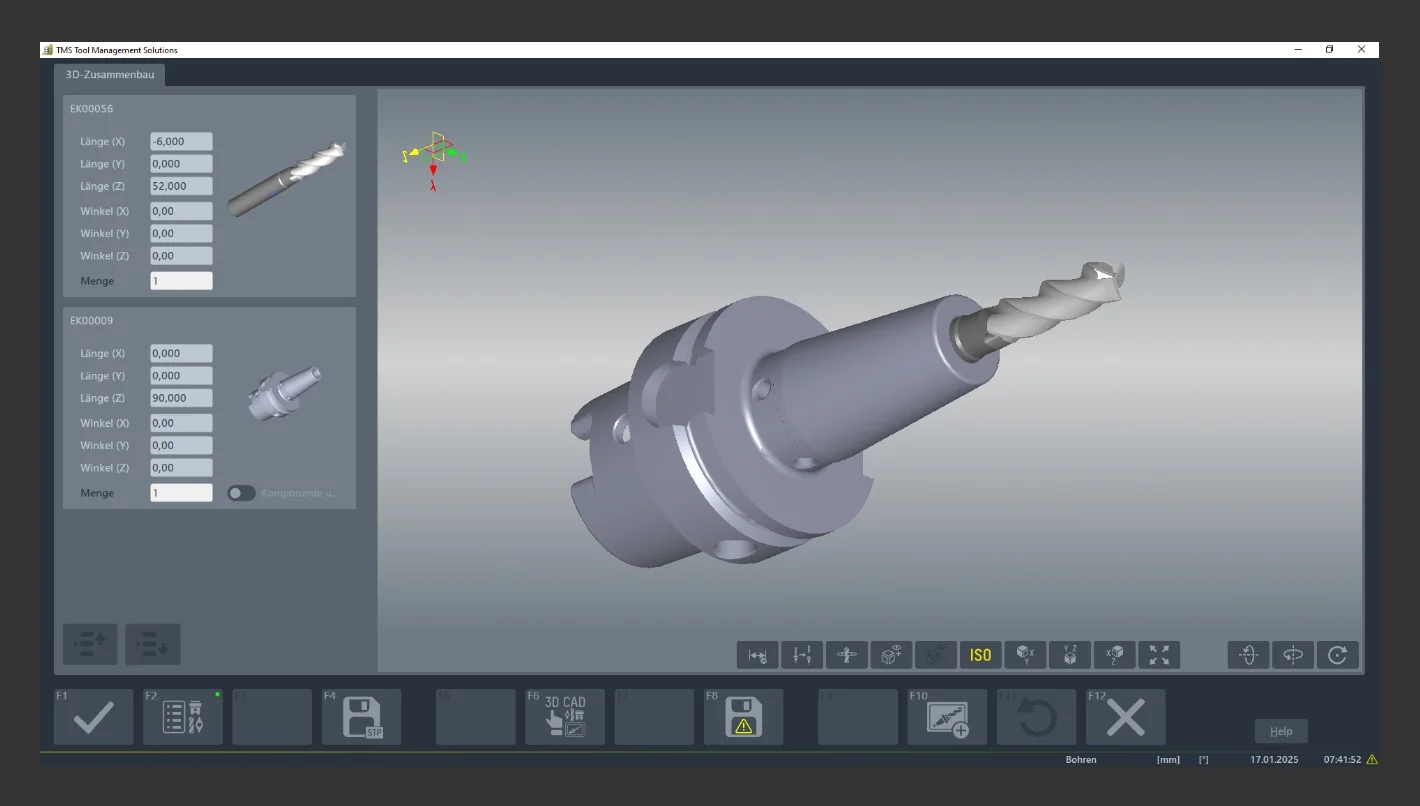
Complete tools consist of several components—usually a tool holder, a tool carrier, and cutting elements. The data for these components is typically available in the ZOLLER TMS Tool Management Solutions tool and tool data management system as master data as well as in 2D and 3D graphics. Using the graphical assembly function, complete tools can thus be quickly, easily, and reliably generated virtually, created as a data set, and saved.
Combine only plausible components
To do this, work planners first select components using lists in the ZOLLER TMS Tool Management Solutions software. A wide range of freely selectable search criteria makes this very easy. For example, components can be selected based on symbolic graphics according to machining processes, tool holder sizes and designs (in accordance with ISO and DIN), or according to required cutting edge diameters.
The additional “Interface Coding” function proves particularly advantageous for fast and reliable selection. It automatically checks the interfaces of the selected components. When components are arranged in accordance with DIN standards, the individual component library automatically filters out incompatible elements. Thus, for example, tools with Weldon shanks of 10 mm diameter can only be combined with holders of the same dimensions and designs. This ensures maximum process reliability when assembling complete tools.
After selecting suitable individual components, a 2D graphic including dimensions is automatically generated. This includes, among other things, the lengths over which a shank is to be shrink-fitted or screwed in. In addition, the 2D graphic shows the assumed zero point of the complete tool, which is required for setup and measurement for the NC program.
View photorealistically
Volume models of the complete tools can be created at the touch of a button. The generated 3D models are then saved in the ZOLLER »z.One« database. These graphics serve as the basis for programming in the respective CAD/CAM systems.
A wide range of CAD/CAM systems can import this data using a ZOLLER interface. Manufacturing companies are thus independent of the choice of CAM system. They can also switch to other CAD/CAM software easily and without any problems.
Clear assignment
To enable work planners to quickly and easily identify and determine the components required for assembly, the graphical assembly in the 3D models of the complete tools displays the components in different colors. When the graphics are clicked, the software module highlights the relevant components in the lists displayed in parallel. This allows assembly specialists to reliably identify these components and assemble them with process reliability.
Custom expansion
Numerous manufacturing companies use custom-designed tools. These can also be imported into the ZOLLER TMS Tool Management Solutions software. To do this, simply create files in STEP format in the 3D CAD system and save them to the ZOLLER »z.One« database. Of course, the graphical assembly feature enables the assembly of complete tool sets for all types of tools used in various machining processes. This allows grinding wheel sets and non-rotationally symmetric turning tools to be automatically assembled from selected components using the same procedures as for milling and drilling tools. For components designed and dimensioned strictly in accordance with DIN standards, the system automatically checks whether the interfaces of the components fit together and whether an assembly is feasible. Thus, the graphical assembly ensures that manufacturing companies work particularly efficiently and with process reliability when assembling complete tools. This shortens lead times, increases flexibility, and reduces costs.




 Back to overview